
You sit down to work, answer a few emails, and join a video call. Suddenly, it’s late afternoon and your eyes feel heavy, dry, and tired. This feeling is familiar to many people. Screen time at home has climbed steadily, and your eyes are carrying the load every single day.
You can significantly reduce digital eye strain by optimizing your monitor height, managing your room’s lighting, and following the 20-20-20 rule. Making these few thoughtful changes to your workspace setup can help protect your vision for the long term.
Signs That Your Workspace May Be Straining Your Eyes
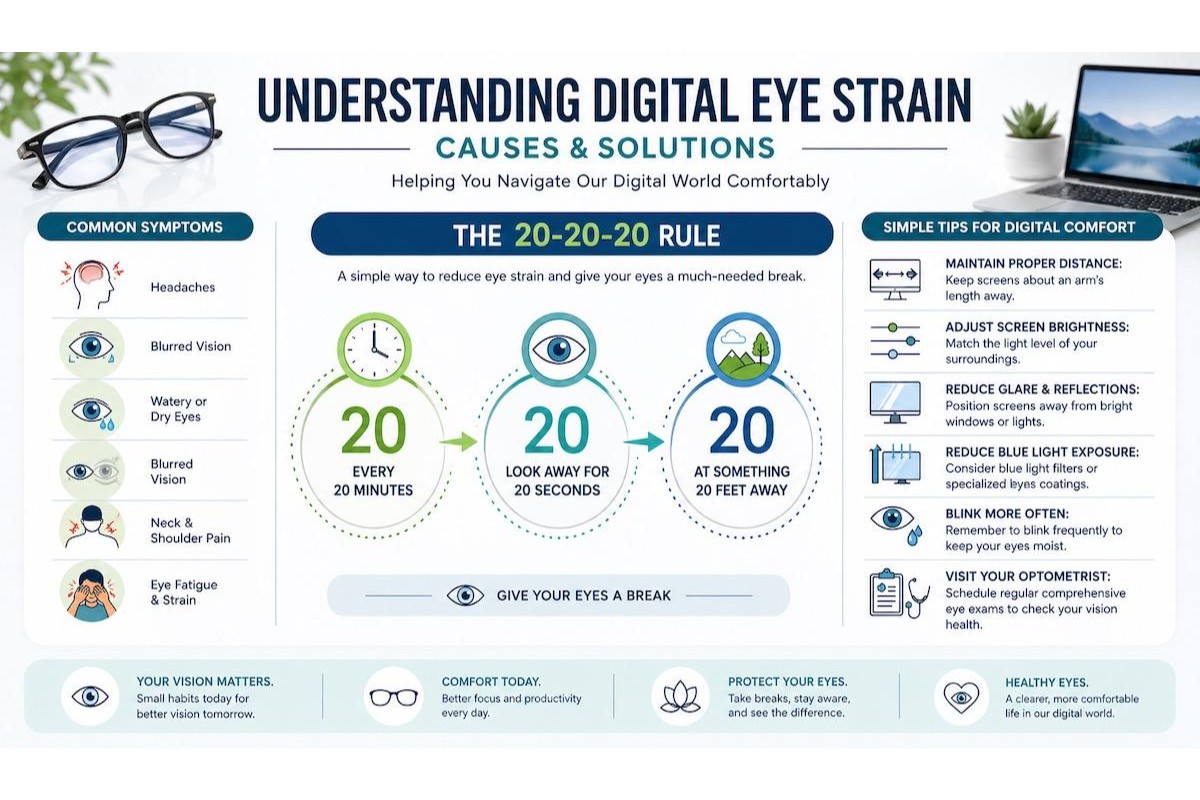
Eye strain doesn’t always announce itself clearly. You may notice your vision gets blurry near the end of a long workday, or you might start getting headaches around your temples or forehead.
Watch for these common symptoms:
- Blurry vision that fluctuates
- Headaches, especially around the brow or temples
- Dry, gritty, or scratchy eyes
- Excessive eye rubbing
- Neck and shoulder tension
Pay close attention to your body. When your monitor sits at the wrong height, your head may tilt forward or upward to compensate. This tension travels down through your body, leaving you feeling stiff and drained.
When Kids Show These Signs Too
Children spend significant time on screens for school and entertainment, but they often can’t describe how their eyes feel. Instead of saying their eyes hurt, they might squint at the screen, rub their eyes frequently, blink excessively, roll their eyes, or start avoiding screens altogether after a short time.
Watch for these behaviours, as kids may not connect physical discomfort to their screen habits. We’re also seeing an increased incidence of kids having incomplete blinks because of the constant vigilance required while looking at a screen, which can cause more dry eye issues. If your child seems to struggle with reading on a screen, holds devices unusually close to their face, or has difficulty tracking words on a page, those are worth noting before their next eye exam. Sometimes screen-related struggles point to underlying issues with how the eyes work together, which vision therapy can help address.
Optimize Your Screen Position and Lighting
The physical layout of your desk plays a massive role in how your eyes feel. Small adjustments to distance and angles can provide quick relief.
Screen Placement and Distance
Your screen should sit roughly an arm’s length away from your face, about 50 to 70 centimetres. That distance gives your eyes enough space to focus comfortably without working overtime. If you find yourself leaning in to read, the text size may need adjusting rather than moving the screen closer.
The top of your monitor should sit at or just slightly below eye level. This keeps your gaze angled gently downward, which is a natural, relaxed position for your eyes. A screen that sits too high forces your eyes to stay wide open, which can contribute to dryness over time.
Lighting in Your Workspace
Bright light directly behind your screen creates glare that your eyes constantly have to fight. Bright light directly in front of you, like a window facing your face, creates the same problem from the opposite direction. Both situations force your eyes to work harder to adjust.
Use these tips to balance your lighting:
- Position your monitor so that the windows are to the side.
- Use soft, indirect lighting instead of harsh overhead bulbs.
- Turn on a warm-toned desk lamp and point it away from the screen to balance the room’s contrast.
Simple Screen Habits
Even with a perfect setup, your eyes need regular breaks from the intense focus required by digital devices.
Follow the 20-20-20 rule: every 20 minutes, look at something about 20 feet away for 20 seconds. This gives your eye muscles a short reset. Additionally, make a conscious effort to blink more regularly. People tend to blink far less often while staring at a screen, which dries out the surface of the eye.
Take short breaks away from your desk to let your focusing muscles rest in a way that looking at a distance alone cannot replicate.
Many of these workspace tips apply to kids too. Make sure your child’s screen is at the right height and distance for their size, not yours.
When a Workspace Fix Is Not Enough
Sometimes the issue goes beyond screen distance and lighting. If your prescription is slightly off, your eyes strain to compensate all day long without you realizing it.
Anti-reflective coatings on your glasses can also help reduce screen glare and reflections that contribute to visual fatigue. While these don’t replace an accurate prescription, they make extended screen work noticeably more comfortable.
If your eyes feel persistently dry, gritty, or irritated even after improving your setup and screen habits, that may point to dry eye, a condition that benefits from more targeted care. Dry eye therapy focuses on addressing the underlying reasons your eyes aren’t staying comfortable on their own. Your optometrist can assess your tear film and recommend a personalized approach based on your specific needs.
In some cases, persistent strain points to underlying issues with how your eyes work together at near distances. Vision therapy can help adults retrain their visual system when eye coordination or focusing struggles are contributing to the problem.
Take the Next Step Toward More Comfortable Vision
Small changes to your workspace can make a real difference in how your eyes feel by the end of the day. Better screen placement, softer lighting, and short regular breaks all add up over time for both you and your children. When these changes aren’t quite enough, it’s time to seek professional guidance.
Schedule a comprehensive eye exam at Dr. Fink Eye Care & Optical Boutique. Our team offers digital eye strain solutions, dry eye therapy, and personalized support for the whole family. Book your appointment today and take the first step toward comfortable vision.